

Claim Form Guide
Nullam in elit nec velit iaculis aliquet sit amet vitae sapien. Nullam eleifend, lorem a ultricies rhoncus, eros mauris fermentum est, in aliquam nisl mi sed nisi. In cursus mauris nibh, ut lobortis dolor elementum at.
Part 1
Part 1 Privacy Release Required for everyone
This part of the Claim Form is required. Do not leave this section blank. This part of the Claim Form is an agreement between you and the Claims Administrator. It must be completed and signed by the person who is making the Claim.
By completing and signing this section, you are acknowledging you understand how your information will be used as part of the Claims Process.
This section does not decide your Claim. It explains roles, responsibilities and how information connected to your Claim may be shared and kept.
Who completes this part
This part must be completed by whoever is making the Claim and must include the name and signature. This part must be completed to process the Claim. It can be completed by:
- The Claimant
- An Estate Representative or Heir for a Claimant who passed away on or after January 25, 2016
- A Personal Representative for a Person Under Disability or an Heir who is under the Age of Majority
Leaving this section blank or forgetting to sign will prevent your Claim from being processed.
The Estate Representative, Personal Representative, or Heir must still personally sign this section — not the helper or lawyer.
Checklist
Name printed clearly
Signature included
Date filled in
Part 1A Claimant Details Required for everyone
This part is required for every Claim. It asks for basic information about the Claimant (the person who experienced harm). Take your time — clear and accurate information helps avoid delays. If you’re completing this for someone else, “you” and “your” throughout refer to the Claimant.
Legal name and Identification
Enter the Claimant’s full legal name exactly as it appears on their government-issued ID.
You must attach a clear copy of the front and the back of the government-issued identification you are providing for the Claimant.
Only send copies. Original documents will not be returned.
Find the list of accepted identification >
If you don’t have identification, you can reach a Claims Helper by calling the Info Line at 1-888-592-9101 and pressing 2.
Social Insurance Number
Enter the Claimant’s nine-digit Social Insurance Number if you have it. This information is optional and a Claim can be submitted without it.

Date of birth
Enter the Claimant’s date of birth. The date of birth must match the date shown on government-issued identification (if the birth date is included). Use numbers only as indicated in the Claim Form.

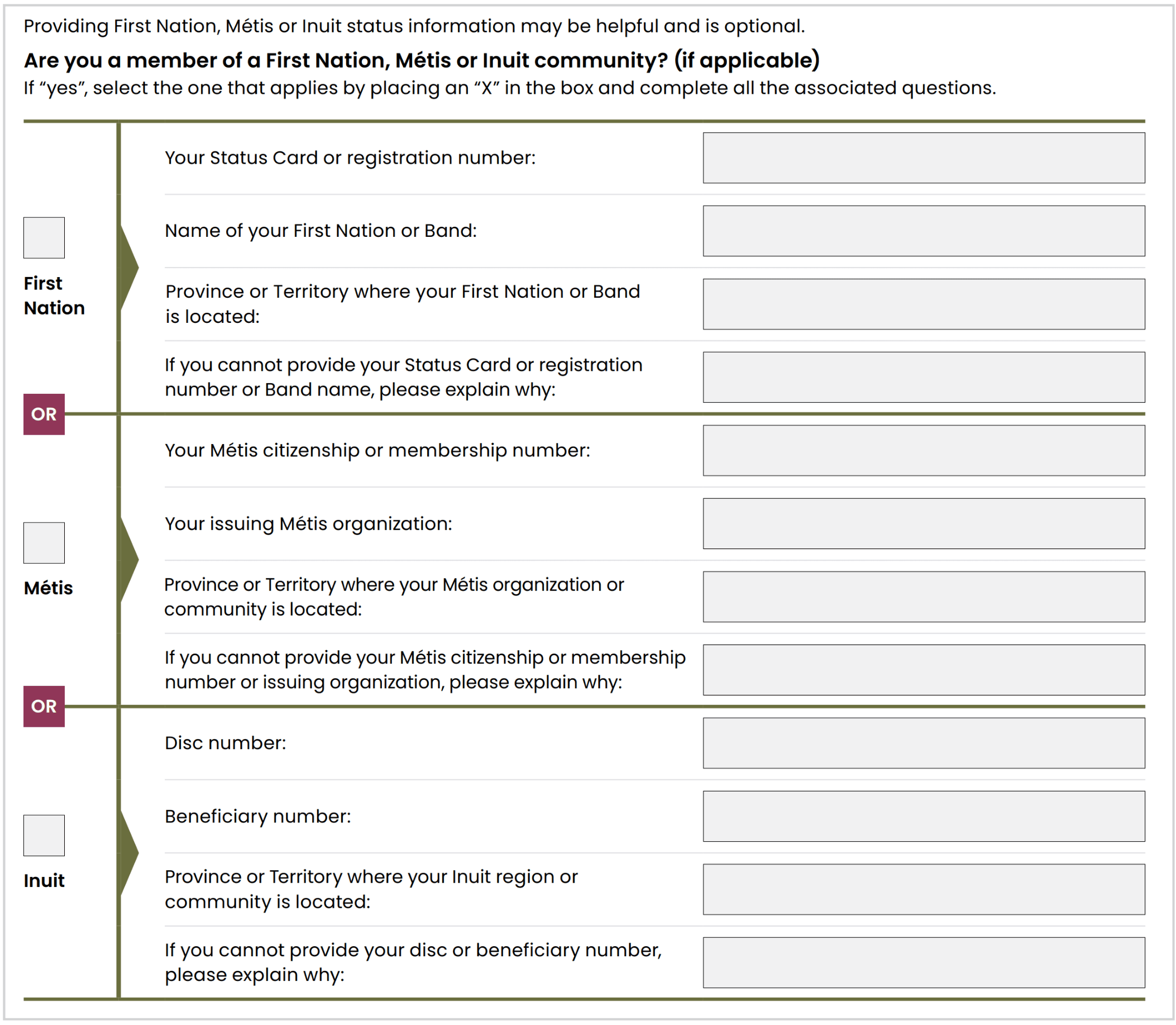
Member of a First Nation, Métis or Inuit community
This section is optional. You can submit a Claim without completing this section. Check the box that applies, then complete the information requested. Answer this section as accurately as you can, based on the Claimant’s information.
Reminder
If a section doesn’t apply to you, leave it blank. Remember to attach your ID and double-check that all dates match.
Checklist
- The Claimant’s legal name is correct
- A clear copy of identification is attached
- Other names are included only if applicable
- The date of birth is correct
- The date of death is included only if the Claimant is deceased
Part 1A Other Names Used If applicable
Complete this only if the Claimant used a different name in the past. If the Claimant’s name has not changed, or if you do not know of any other names, leave this section blank. If the Claimant’s name did change and you have a document showing the name change, include a copy of that document.
Part 1A If the Claimant has passed away If applicable
Complete this section only if the Claimant is deceased. Enter the date of death. The date must match the documentation you provide to confirm the Claimant has passed away.
Acceptable documents may include:
- A death certificate
- A document from Indigenous Services Canada
- A Funeral Director’s Statement of Death
- Burial certificate
- Coroner’s report
Important information:
If the Claimant passed away before January 25, 2016, the Claimant is not eligible for compensation under this Settlement.
Part 1B Contact Information Required for everyone
Provide contact details so the Claims Administrator can reach you about your Claim:
Mailing address
This is the address where you can receive mail. This information is required. Do not leave this section blank. The Claims Administrator will use this address to send letters and, if applicable, a compensation cheque.
Temporary living situations
If you are currently living somewhere that is not a permanent home, include the details in this section. This may apply if you are staying temporarily with family, friends or in another short-term living situation. If this does not apply to you, leave this section blank.
Email address
An email address can help the Claims Administrator contact you more quickly.

Telephone numbers

Keeping your contact information up to date
If your mailing address, email address or phone number changes after you submit your Claim Form, contact the Claims Administrator to provide the updated information.
You can contact the Claims Administrator by calling the Info Line at 1-888-592-9101.
Checklist
- Your mailing address is complete and correct
- All required address fields are filled in
- Your email address is correct, if you provided one
- A phone number where you can be reached is included
Part 2
Part 2 Hospital Admission: Name and Dates Required for everyone
Finding the correct hospital name
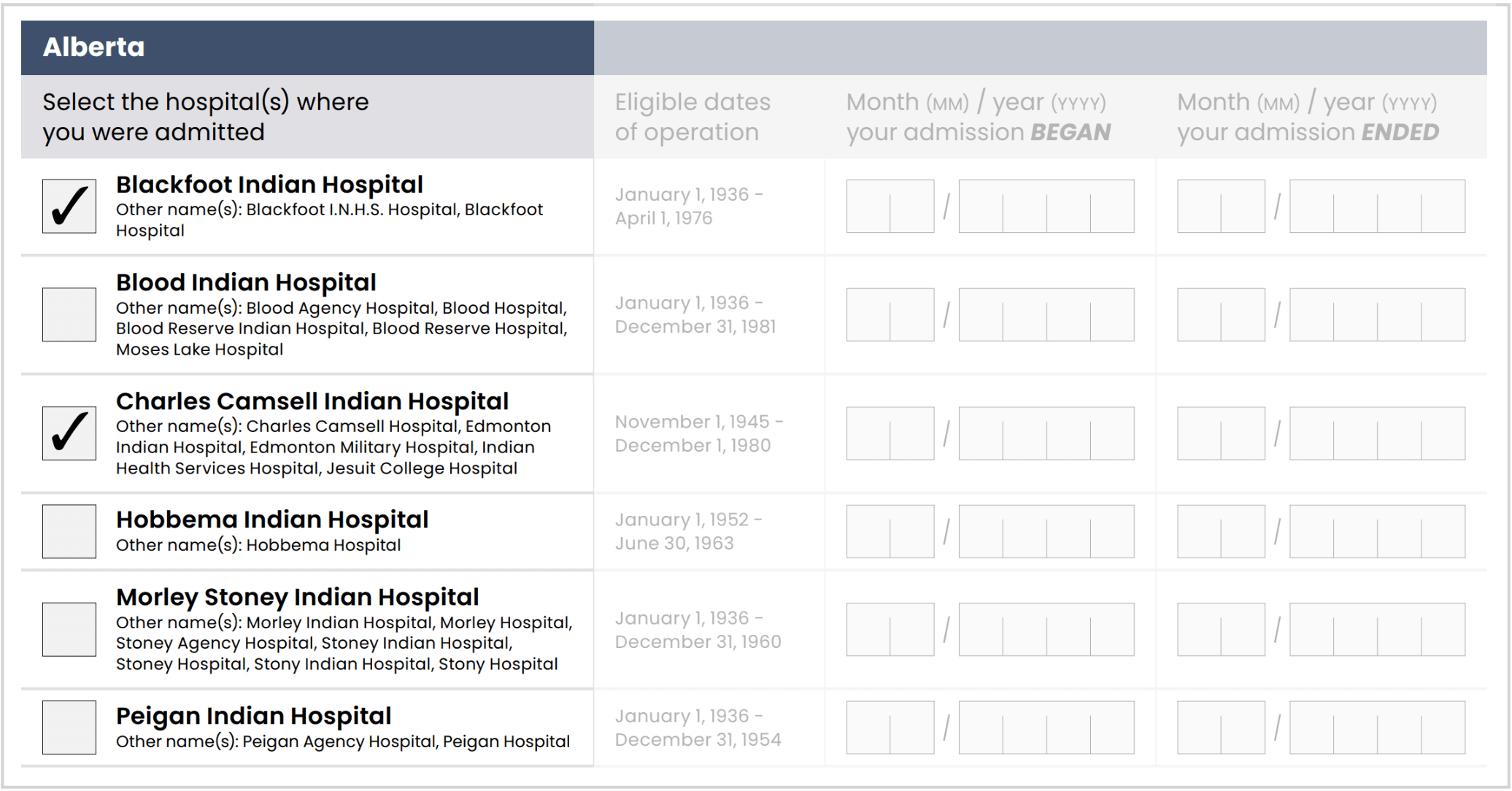
The hospitals listed in the Claim Form are organized by province.
Each hospital appears under one main name. Other names the hospital may have been known by are listed underneath in smaller print.
Selecting the hospital or hospitals
Put a mark in the box next to every hospital where you were admitted during the Claims Period. If you were admitted to more than one Federal Indian Hospital and experienced abuse/harm at each, select all the hospitals that apply.
Entering admission and discharge dates
For each hospital you select, enter:
- The admission or beginning date, and
- The discharge or end date (of all eligible admittances to that hospital)
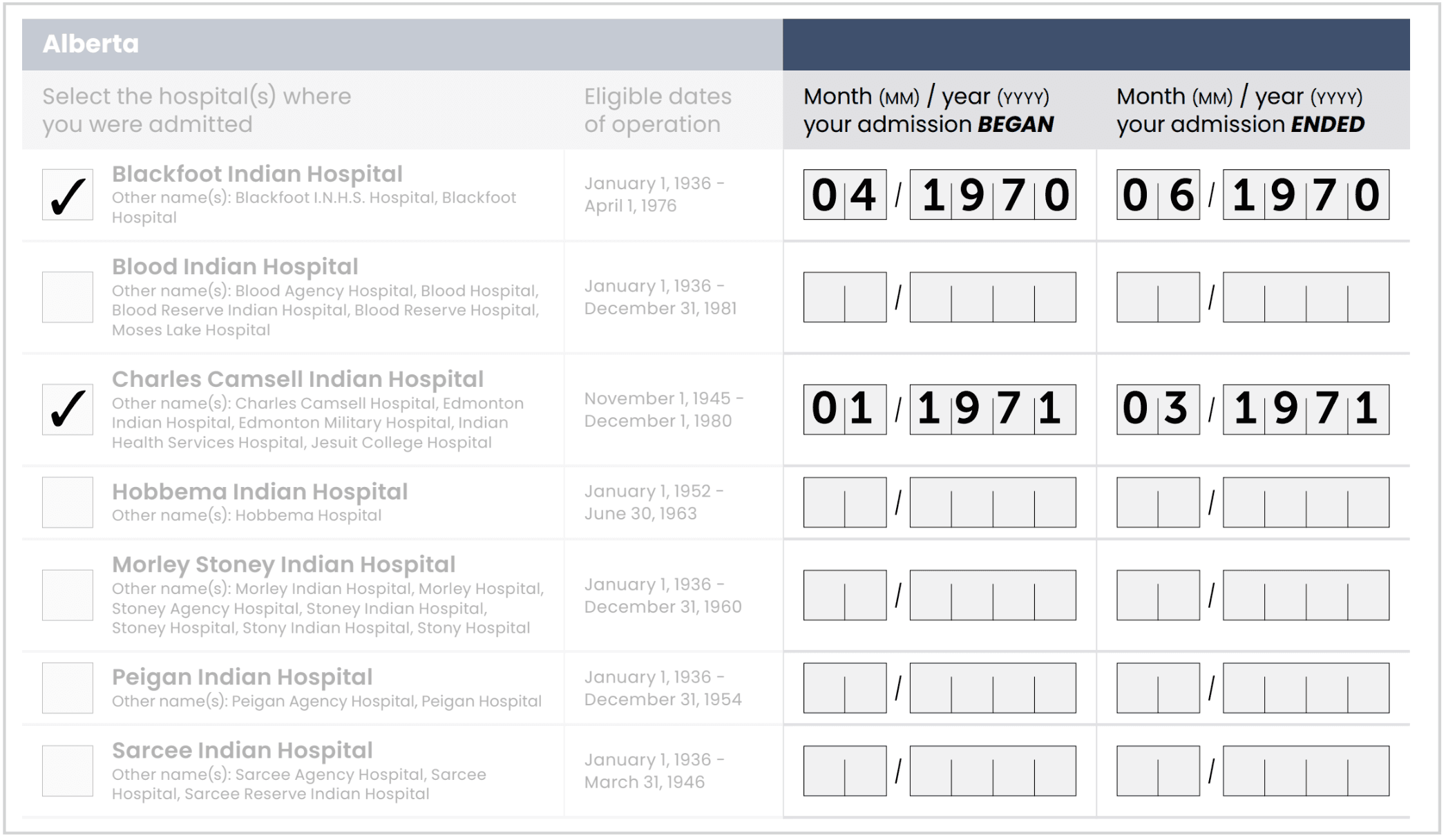
Make sure the dates you enter fall within the eligible dates of operation listed for that hospital.
If you are not sure of the exact dates, provide the best information you have.
For example, if you were admitted to the Blackfoot Indian Hospital on April 6, 1970, and discharged on June 20, 1970, and were admitted to Charles Camsell Indian Hospital on January 7, 1971 and discharged on March 4, 1971, you would check each hospital and include the month and year of both admissions.
Part 2A Hospital Admission: Additional Information Required for everyone
Complete this section for each hospital admission listed in Part 2.
The hospital name and admission period must match the information you selected in Part 2.
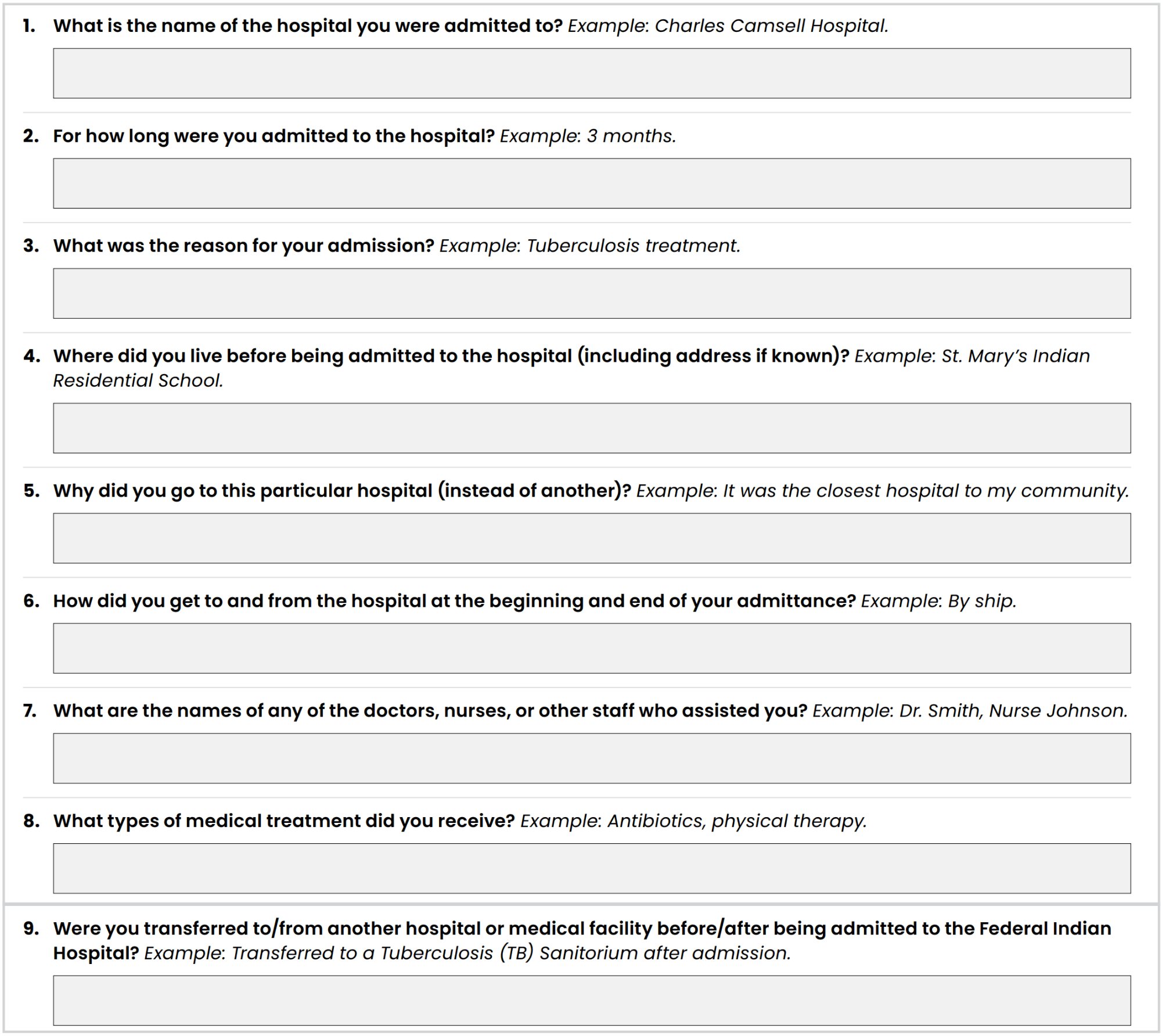
Questions 1 to 9
Answer questions 1 to 9 about your experience during one hospital admission.
- Use the information you remember.
- Provide your best estimate if you do not know an exact date or detail.
- Examples are included on the Claim Form to help you answer.
More than one hospital admission
If you experienced abuse or harm during more than one hospital admission:
- Complete questions 1 to 9 for the first admission in Part 2A.
- Complete questions 1 to 12 in Appendix A for each additional admission.
Use Appendix A if:
- You were admitted to more than one hospital.
- You were admitted to the same hospital more than once.
- You need more space.
You may download or copy Appendix A as many times as needed.
Example: If you are claiming for three hospital admissions, complete Part 2A once and Appendix A twice.
Before submitting your Claim, make sure you have included information for every hospital admission.
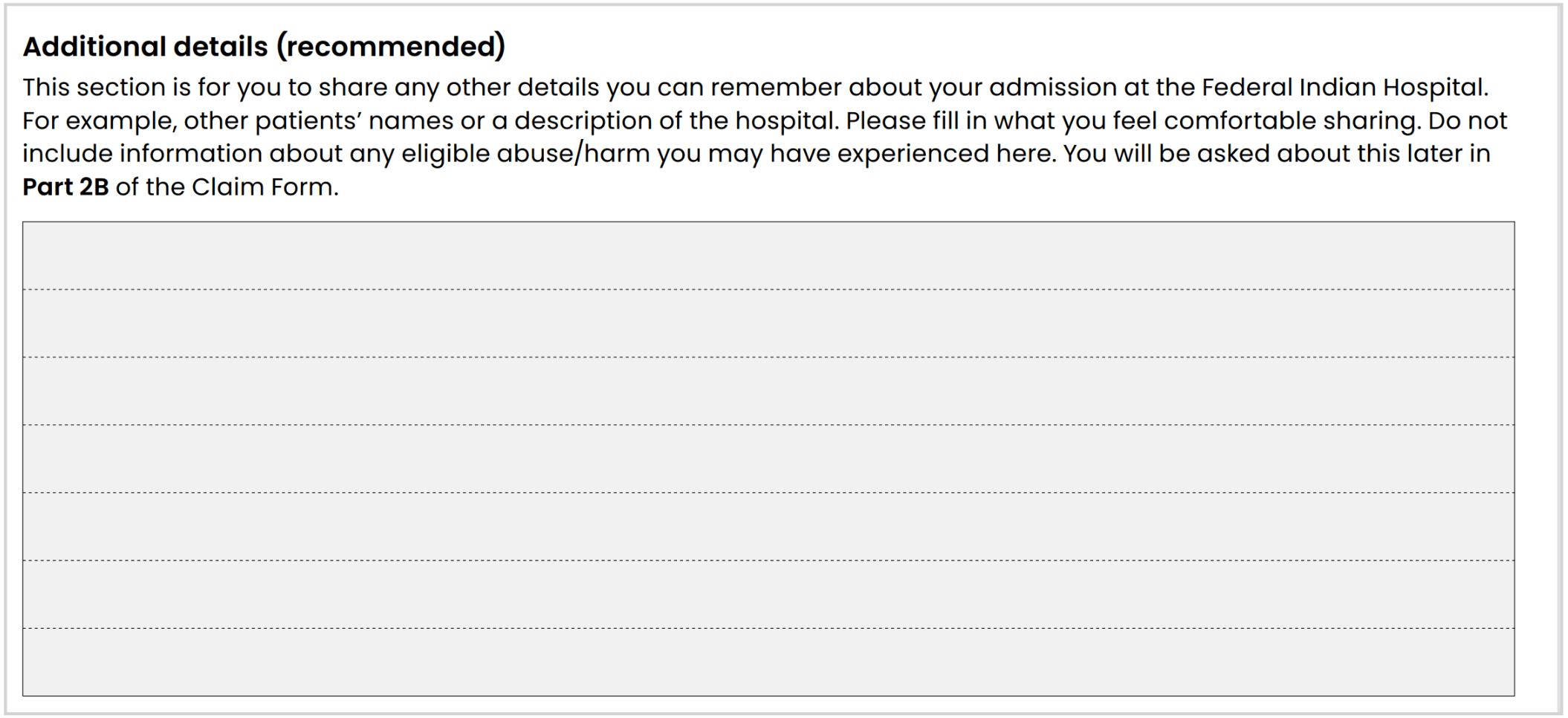
Part 2A Additional details about hospital admissions Optional, but recommended
Use this section to provide other information about your hospital admission that you have not already included.
You may include details about:
- Admission
- Transfers
- Discharge
- Your time at the hospital
Do not describe abuse or harm in this section. You will be asked about that in the next part of the Claim Form.
Leave this section blank if you have nothing else to add.
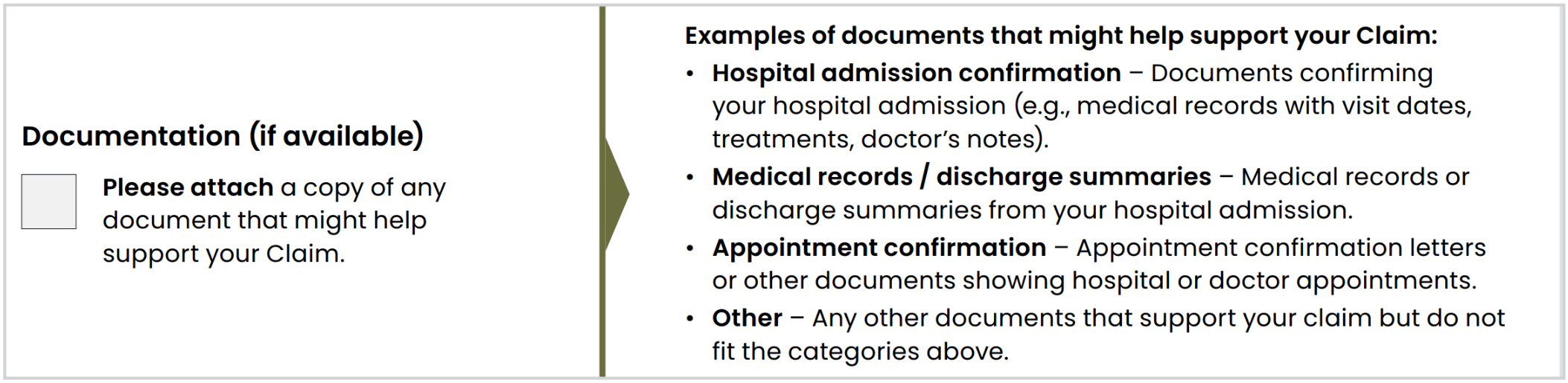
Part 2A Relevant documents related to hospital admission If applicable
Complete this section only if you have documents related to your hospital admission.
If you have documents:
- Check the box on the left.
- Review the examples of documents listed on the right.
- Attach copies only. Do not send originals.
- Write your first and last name and date of birth on each copy.
The list of documents on the Claim Form is only a guide. You do not need to have every document listed.
Leave this section blank if you do not have any documents.
Part 2B Hospital Admission: Abuse/Harm Experienced Required for everyone
This section asks about abuse/harm experienced while you were admitted to a Federal Indian Hospital. Reading and writing about these experiences can be very difficult. You do not have to do this alone.
Choose one level of harm
Read all five levels and select one level.
Choose the highest level that applies to your overall experience across all hospital admissions.
The examples are provided to help you understand the levels, they are not a complete list. Claims are assessed using the wording in the Compensation Grid.
The Settlement does not provide compensation for medical malpractice or claims related to medical treatment.
Confirm your level
Write the number of the level you selected, from 1 to 5, in the box provided.
Choose carefully. You cannot change your level after submitting your Claim Form.

Age and consent
Complete this section if:
- You experienced sexual abuse or harm
- You were over 18 when it happened
- You did not consent
Otherwise, leave it blank.

Describe your experience
Answer all six questions for each experience of abuse or harm.
The questions ask:
- When it happened
- Where it happened
- Who was involved
- What happened
- What else you remember
Answer in your own words. You do not need to use legal or medical language.
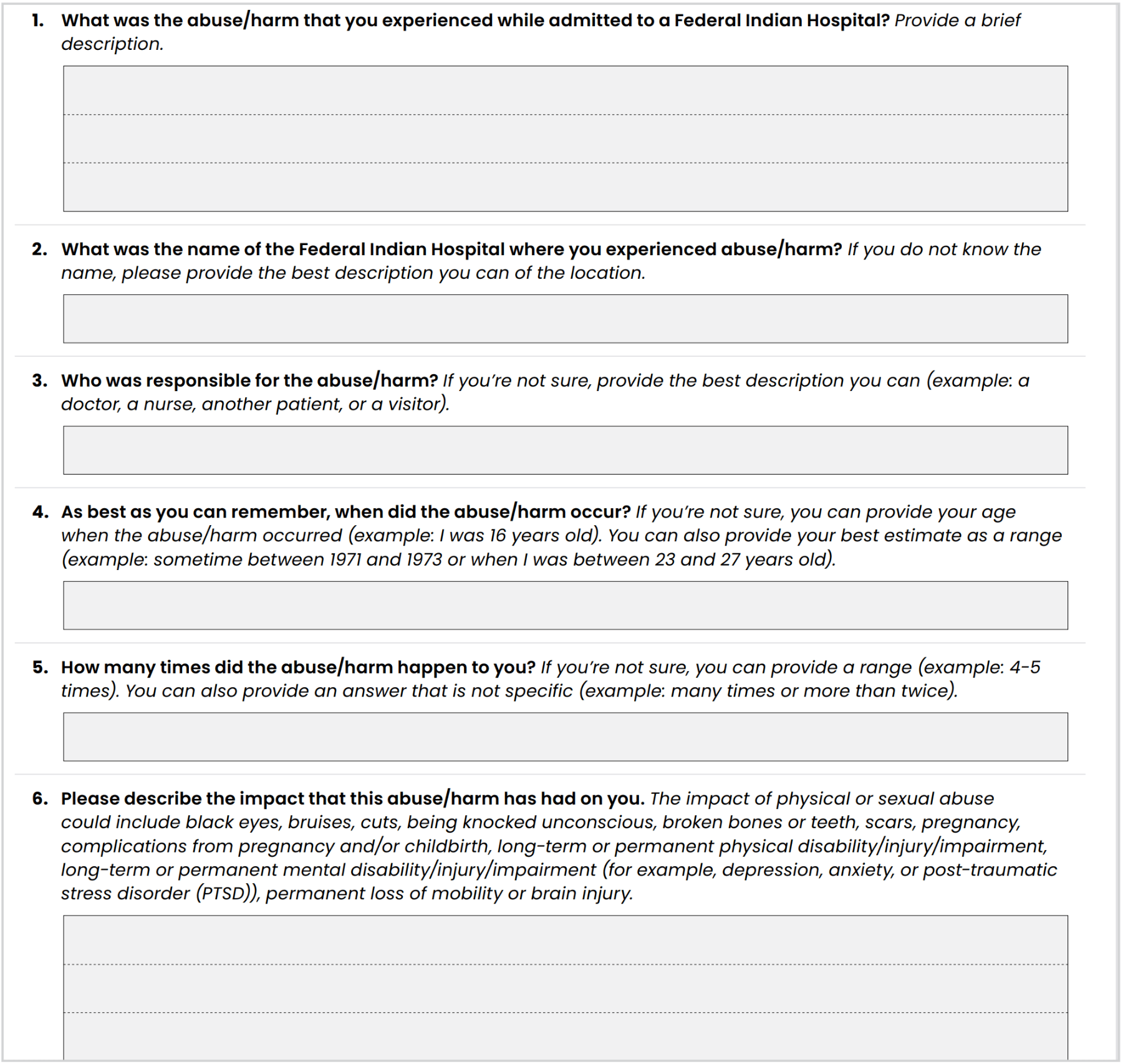
Make sure the hospital name matches the hospital selected in Part 2.
There is space for up to three experiences. Use Appendix B if you need more space or have more experiences to include. You may copy or download Appendix B as many times as needed.
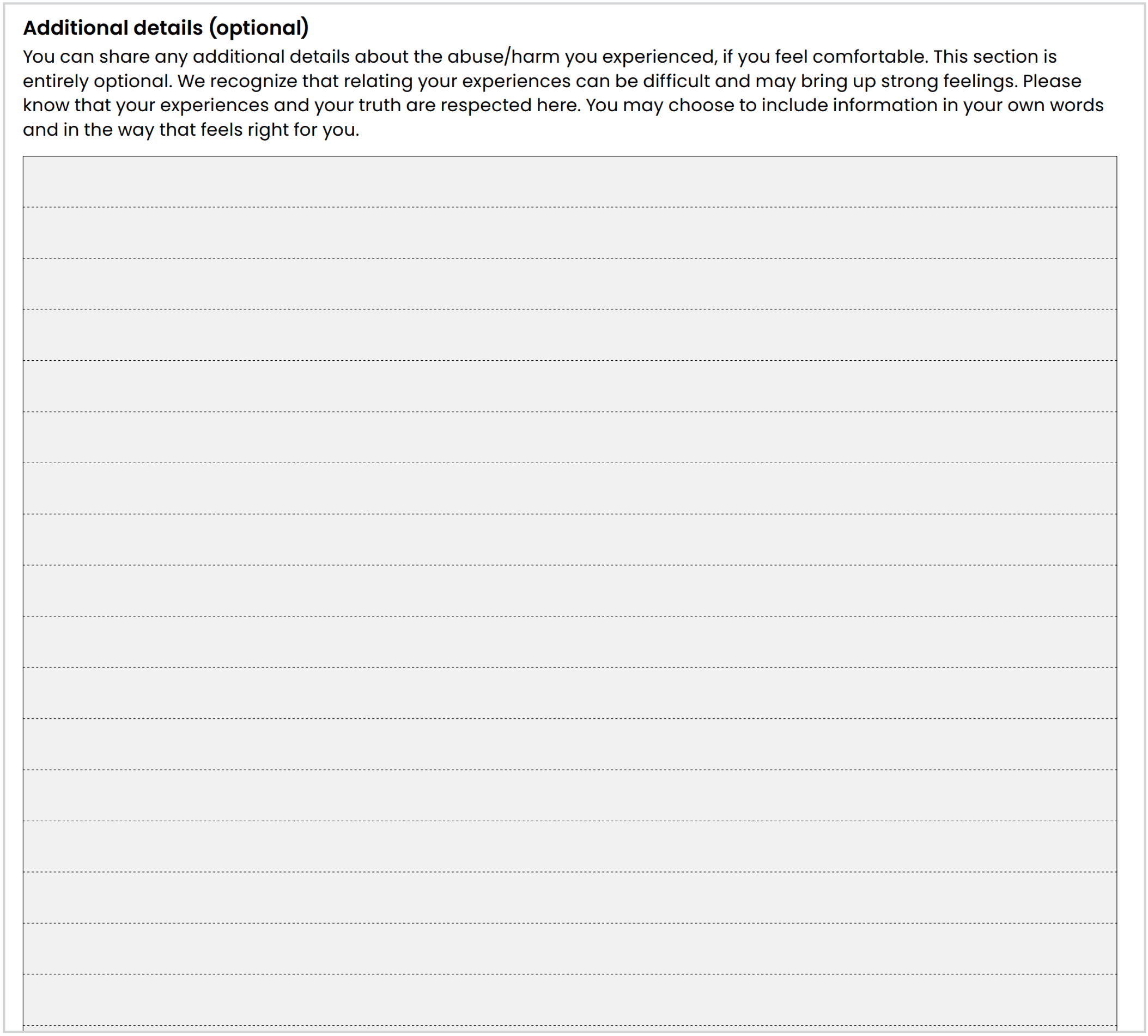
Part 2B Additional details about Abuse/Harm Experienced Optional
Use this space to add anything you have not included elsewhere.
Share only what you feel comfortable sharing. Leave it blank if you have nothing else to add.
Part 3
Part 3 Payment Details Required for everyone
Tell the Claims Administrator how you want to receive payment if your Claim is approved.
Choose one payment option:
- Cheque
- Direct deposit
If a lawyer or representative is completing the form, they must enter the Claimant’s payment details, not their own.
Whose banking information to provide
- Claimant: Your own banking information
- Estate Representative: The Estate’s banking information
- Heir: Your own banking information
- Person Under Disability or Heir under the Age of Majority: The Claimant’s banking information, unless the representative document requires another arrangement
Payment by cheque
The cheque will be mailed to the address provided earlier in the Claim Form.
Make sure the mailing address is complete and correct.
Different rules may apply if the Claim is submitted by an:
- Estate Representative
- Heir
- Personal Representative
- Representative for a person under the Age of Majority

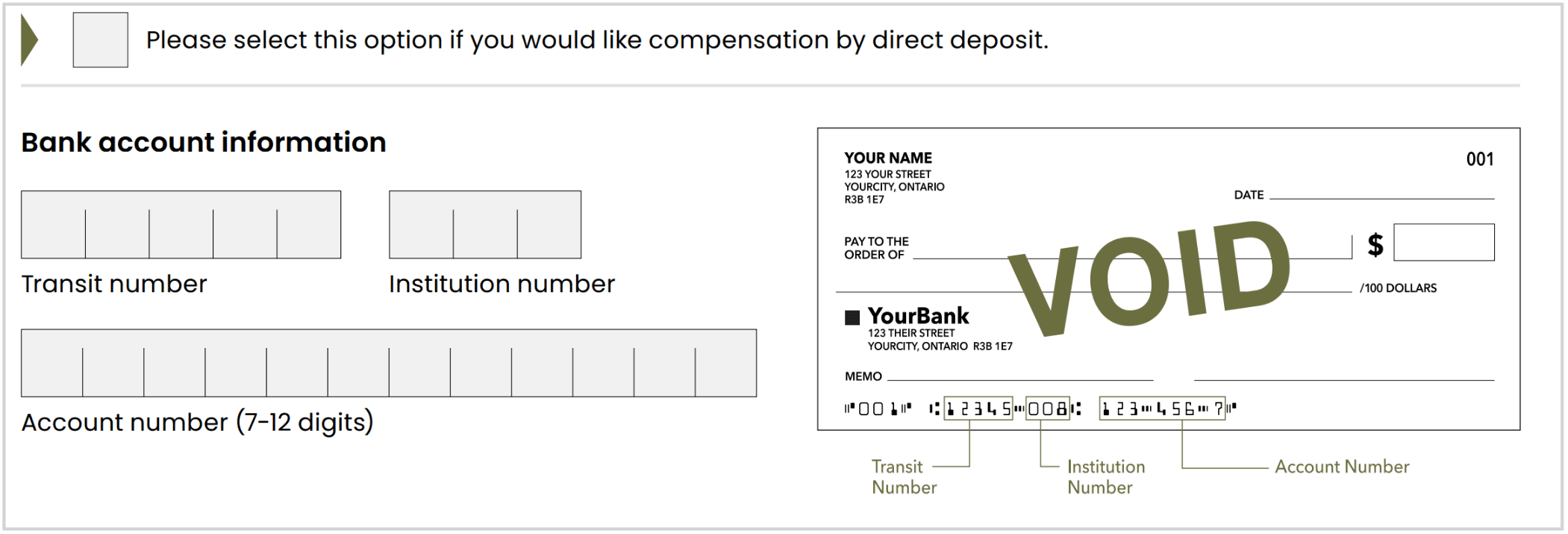
Payment by direct deposit
Complete all banking fields using the information shown on the correct bank account.
You will usually need:
- Transit number
- Institution number
- Account number
You can find this information on a cheque, direct deposit form or through online banking.
Checklist
Before moving on, check that:
- You selected only one payment option
- Your mailing address is correct
- You provided banking information for the correct person or Estate
- All banking numbers are accurate
Appendices
Additional sections you may need to complete
Appendix A
Any Additional Federal Indian Hospital Admission(s)
Appendix B
Additional Details About Your Experience at a Federal Indian Hospital
Appendix C
Deceased Claimant: Estate Representative (With or Without a Grant of Authority)
Appendix D
Personal Representative for a Claimant who is a Person Under Disability
Appendix E
Individual Legal Counsel
Appendix F
Completed Claim Form Checklist
Appendix A Any Additional Federal Indian Hospital Admission(s) Optional
This Appendix is required if you experienced abuse/harm at more than one hospital admission during the Claims Period.
This can include:
- More than one admission to the same Federal Indian Hospital
- Admissions to more than one Federal Indian Hospital
- A combination of both
Complete one section per admission
For each additional admission:
- Complete one full set of questions
- List each admission separately
- Provide the hospital name and admission dates
- Give your best estimate if you do not remember exact details
Do not combine multiple admissions into one set of answers.
Make sure the hospital name matches the hospital selected in Part 2.
Need more space?
You can:
- Download another copy of Appendix A
- Attach additional paper
Submit all completed copies and extra pages with your Claim Form.
Additional details
Use this space only for details about the hospital admission itself.
Do not include details about abuse or harm here. Include those in Part 2B or Appendix B.
Documents
You can complete Appendix A even if you do not have documents.
If you include documents:
- Send copies only
- Do not send originals
- Write your name and date of birth on each copy
Checklist
- List each additional hospital admission separately
- Make sure each hospital name matches Part 2
- Include admission dates, if known
- Answer each question as accurately as you can
- Keep abuse or harm details in Part 2B or Appendix B
- Attach all completed Appendix A pages to your Claim Form
Appendix B Additional experiences of abuse or harm Optional
Complete Appendix B only if you need more space to describe experiences not fully included in Part 2B.
Submit all completed Appendix B pages with your Claim Form.
Complete one section per experience
For each additional experience:
- Answer questions 1 to 6
- Describe each experience separately
- Include when and where it happened
- Include who was involved and what happened
- Add any other details you remember
Answer in your own words. You do not need legal or medical language.
Give your best estimate if you do not remember exact details.
Need more space?
You can download or copy Appendix B as many times as needed.
Use a separate set of questions for experiences that happened:
- At different hospitals
- During different admissions
- At different times
Review your selected level
Make sure the information in Part 2B and Appendix B supports the level of harm you selected.
You cannot change your selected level after submitting your Claim.
Documents
You can complete Appendix B without documents.
If you include documents:
- Send copies only
- Do not send originals
- Write your name and date of birth on each copy
Checklist
- Answer questions 1 to 6 for each additional experience
- List each experience separately
- Make sure each hospital name matches Part 2
- Check that the information supports the level selected in Part 2B
- Include only experiences not already fully described
- Attach all completed Appendix B pages to your Claim Form
Appendix C Deceased Claimant: Estate Representative (With or Without a Grant of Authority) If applicable
Use Appendix C to:
- Provide your own information
- Explain your authority to submit the Claim
- Attach the required documents
Complete only the sections that apply to your role:
- Estate Representative
- Liquidator in Québec
- Heir
- Personal Representative for an Heir under the Age of Majority or a Person Under Disability
Your information
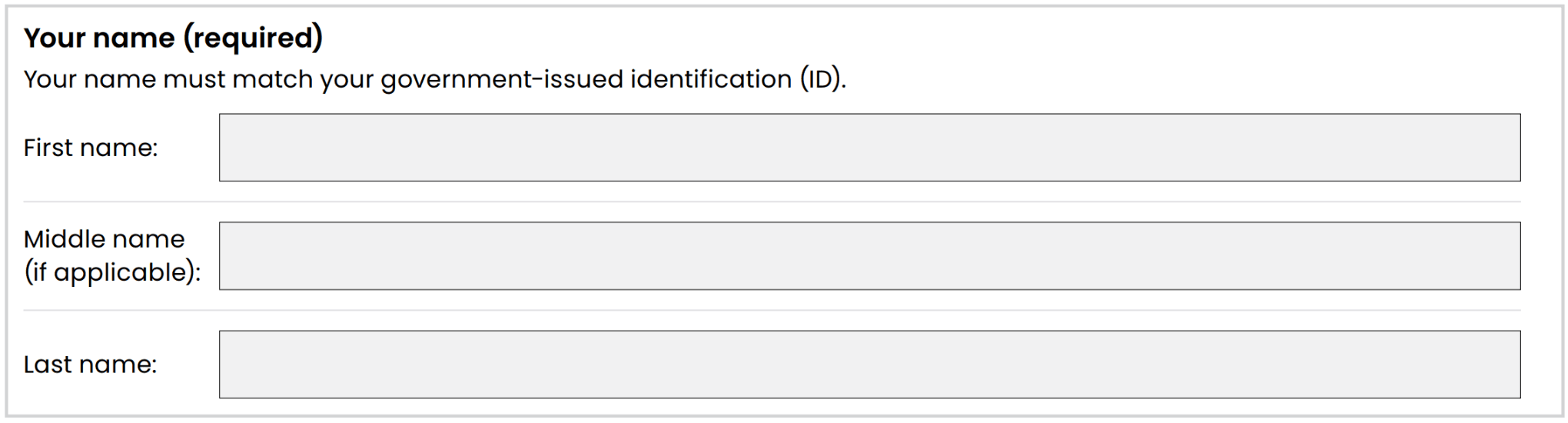
Provide the information of the person submitting the Claim, not the deceased Claimant.
Include:
- Your full legal name
- A clear copy of your government-issued identification
- Your complete mailing address
- A phone number
- An email address, if available
Your legal name must match your identification.
Send copies only. Do not send original documents.
Select your authority
Check one box to show your authority to submit the Claim.
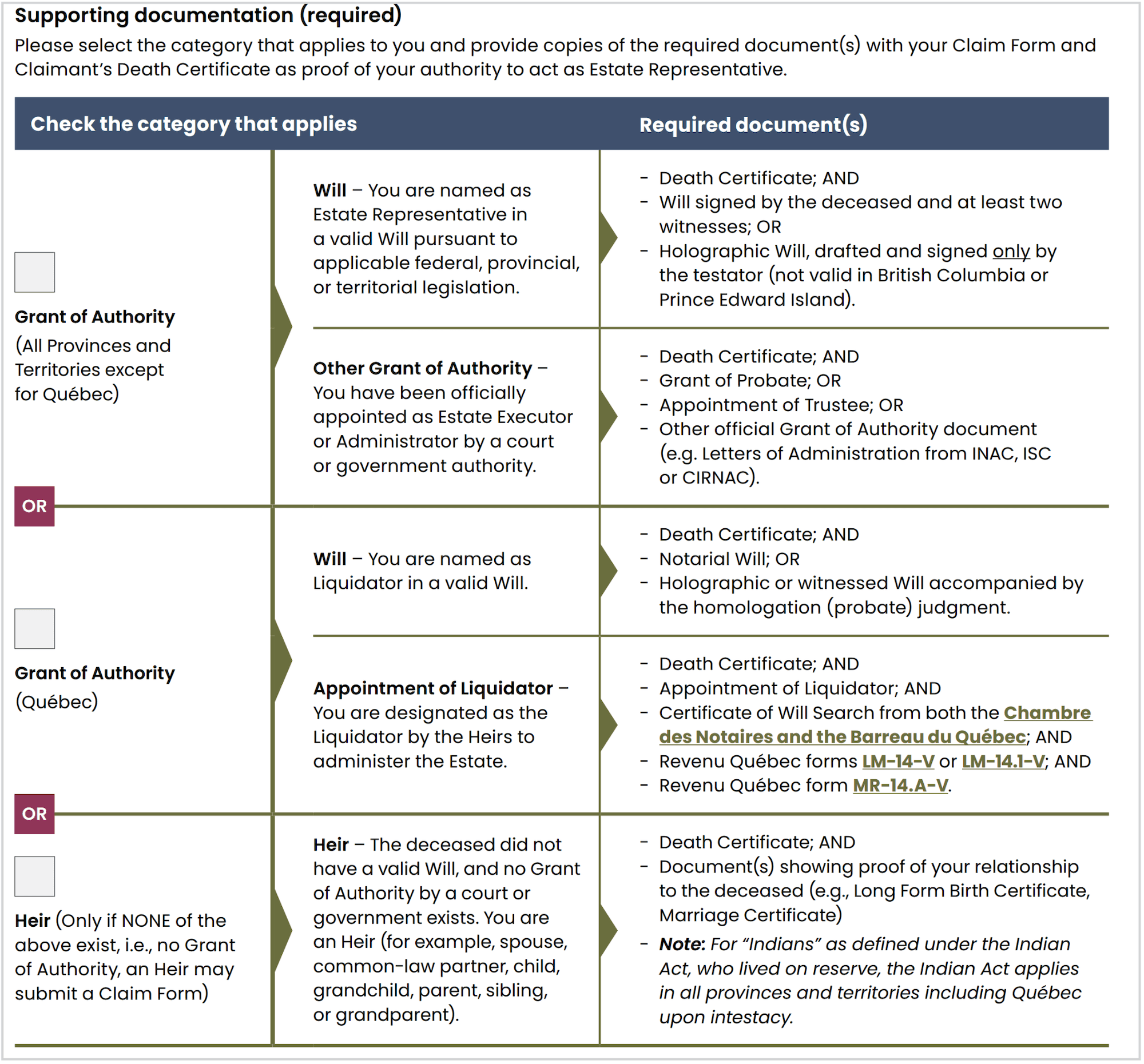
Attach the documents required for your situation.
Estate Representative outside Québec
If you are named in a Will, attach:
- The Death Certificate
- The complete valid Will
If you were appointed by a court or government authority, attach:
- The Death Certificate
- The Grant of Probate, Letters of Administration or other appointment document
Liquidator in Québec
If you are named in a Will, attach:
- The Death Certificate
- The complete valid Will and any required probate judgment
If you were otherwise appointed as Liquidator, attach:
- The Death Certificate
- The Appointment of Liquidator
- Certificates of Will search
- The required Revenu Québec forms
Heir Claimant
Complete this section only if there is no Grant of Authority.
You must:
- Attach the Death Certificate
- Provide proof of your relationship to the deceased Claimant
- Complete Steps 1 to 3 in the Heir section
You must confirm that:
- There is no Grant of Authority
- You made reasonable efforts to find a Will
- You are the highest-priority living family member, or
- You have written consent from the person with higher priority
The priority order is:
- Spouse
- Children
- Parents
- Siblings
- Grandparents
- Aunts or uncles
If you do not have documents proving your relationship, you may provide a sworn declaration signed by an accepted Guarantor.
Checklist
- Complete your personal and contact information
- Attach a clear copy of your identification
- Select the correct authority option
- Attach the Death Certificate
- Attach all documents required for your role
- Include proof of relationship, if submitting as an Heir
- Include written consent, if required
- Send copies only, not originals
- Make sure all documents are clear and readable
Appendix D Personal Representative for a Claimant who is a Person Under Disability If applicable
Required if you are submitting a Claim for a Person Under Disability
Complete Appendix D if you are legally authorized to act for:
- A living Claimant who is a Person Under Disability
- An Heir who is a Person Under Disability
- An Heir who is under the Age of Majority
For a living Claimant, complete Appendix D, not Appendix C.
Your information
Provide your information, not the Claimant’s.
Include:
- Your full legal name
- A complete mailing address
- A phone number
- An email address, if available
Your legal name must match your government-issued identification.
Attach clear copies of the front and back of your identification. Do not send originals.

Select your authority
Check one box to show how you are authorized to act for the Claimant.
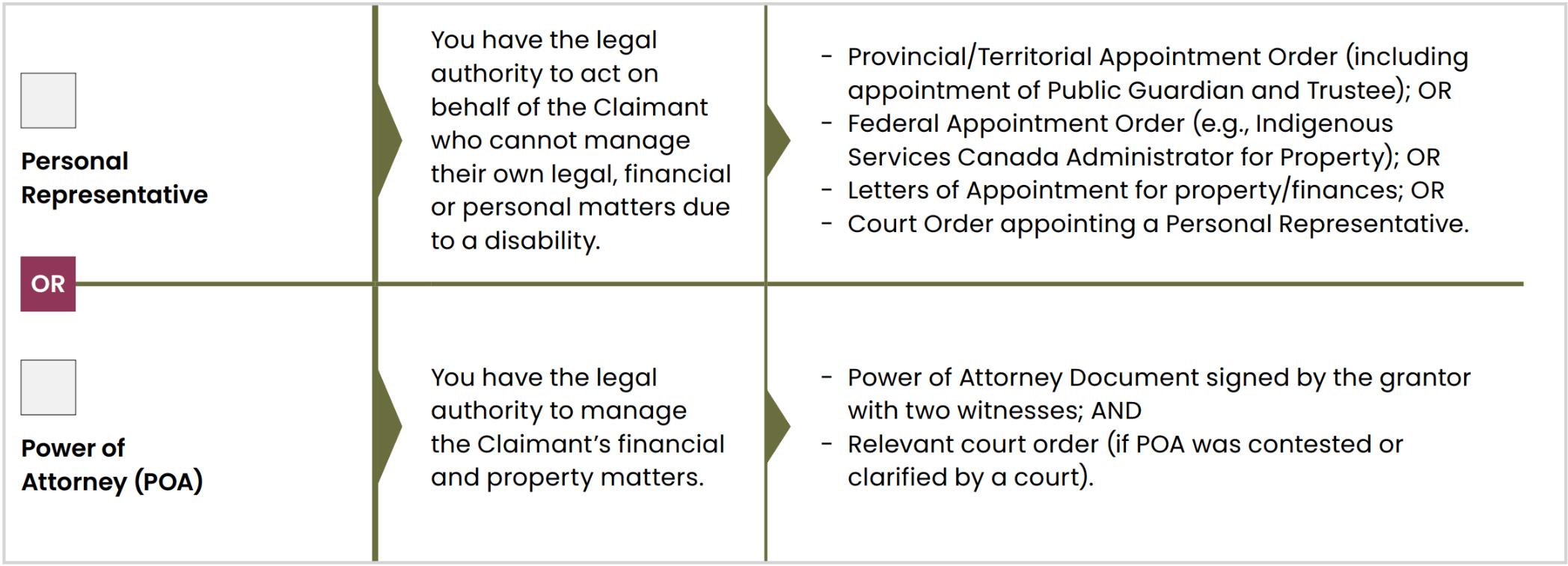
Personal Representative
Attach at least one document showing your authority, such as:
- An Appointment Order
- Letters of Administration
- A Certificate or Court Order appointing you
The document must clearly show that you can act for the Claimant.
–img–
Power of Attorney
Attach:
- The signed Power of Attorney
- Any relevant court order, if applicable
The Power of Attorney must be valid and apply to the Claimant.
Important
Payment and banking information should be in the Claimant’s name, unless the document appointing you allows another arrangement.
Send clear copies only. Do not send original documents.
Checklist
- Complete your personal and contact information
- Attach the front and back of your identification
- Select the correct authority option
- Attach documents showing your legal authority
- Make sure all copies are clear and readable
- Provide banking information for the correct account
Appendix E Individual Legal Counsel If applicable
Complete Appendix E only if a lawyer helped complete or submit the Claim Form.
Claimants do not need to hire a lawyer. Free support is available from the Claims Administrator and Claims Helpers.
Lawyer information
The individual lawyer must complete their information in Appendix E.
Requesting payment of legal fees
If the lawyer is requesting legal fees, they must submit:
- A completed Appendix E
- A written retainer agreement
- The required Legal Fees Request Form
- Any other documents required by the Individual Legal Fees Protocol
The lawyer is responsible for making sure all required documents are submitted.
Written retainer agreement
The retainer agreement confirms:
- That the Claimant agreed to receive help from the lawyer
- The terms of the lawyer’s services
The agreement must meet the requirements of the Individual Legal Fees Protocol.
How legal fees are paid
If the Claim is approved:
- The lawyer may request legal fees from the Claims Administrator
- Approved fees are paid separately by the Government of Canada
- Legal fees cannot be deducted from the Claimant’s compensation
- Fees may be up to 5% of the compensation amount, including disbursements, plus applicable taxes
A lawyer may apply to the Court for an amount above 5%, up to 10%. Any approved amount is still paid by the Government of Canada and not deducted from the Claimant’s compensation.
Legal fees are not available if the Claimant is not approved for compensation.
Checklist
- Complete Appendix E only if a lawyer assisted with the Claim
- Make sure the lawyer completed all required information
- Include the written retainer agreement
- Use the correct Legal Fees Request Form
- Follow the Individual Legal Fees Protocol